
Скачать Excelformulabot – инструмент аналитика данных Excel с поддержкой ИИ
Обзор
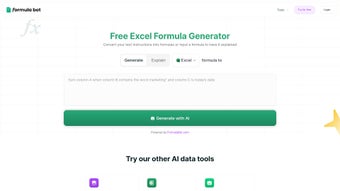
Excelformulabot — передовой инструмент аналитика данных на базе ИИ, который внедряет возможности искусственного интеллекта непосредственно в Microsoft Excel и Google Sheets. Предназначенный для бизнес‑аналитиков, специалистов по данным и всех, кто ежедневно работает с электронными таблицами, платформа упрощает создание формул, подготовку данных и продвинутую аналитику без необходимости глубоких знаний программирования. Пишете команды на естественном языке — так же, как в ChatGPT — и получаете мгновенно сгенерированные формулы, объяснения и визуальные инсайты, что значительно сокращает ручной труд. Генератор формул может предлагать сложные массивные формулы, логику сводных таблиц или даже объяснять, почему конкретный расчёт работает определённым образом. Анализатор данных позволяет загружать сырые наборы данных, задавать вопросы на простом английском и получать готовые диаграммы, статистические сводки и рекомендации за считанные секунды. Доверяют Fortune 500 и правительственным организациям, Excelformulabot доказал свою надёжность, безопасность и масштабируемость в критически важных средах. Нужно ли очистить данные с помощью regex, выполнить запросы в стиле SQL в таблице или автоматизировать повторяющиеся задачи с пользовательскими скриптами — Excelformulabot предлагает единое, безопасное и постоянно обновляемое решение, которое без проблем вписывается в существующие рабочие процессы Excel.
Основные функции, которые переопределяют рабочие процессы таблиц
- AI Formula Generator: Генерировать или объяснять любую формулу Excel с помощью естественного языка. Движок может создавать VLOOKUP, XLOOKUP, INDEX‑MATCH, динамические массивы и многое другое, предоставляя пошаговое руководство.
- Data Analyzer: Загружайте CSV или Excel‑файлы, задавайте вопросы типа «Каков рост месяц‑к‑месяцу?» и получайте мгновенные диаграммы, таблицы и статистические инсайты.
- Script Builder: Создавайте переиспользуемые скрипты в стиле VBA или Office‑Script без написания кода; ИИ преобразует инструкции на обычном английском в готовые к запуску скрипты.
- Basic Tasks Automation: Автоматизируйте повторяющиеся действия, такие как очистка данных, удаление дубликатов и форматирование, одним щелчком.
- Regex Helper: Создавайте регулярные выражения для сложного извлечения или валидации текста, с объяснениями и примерными данными.
- Spreadsheet Maker: Генерируйте полностью отформатированные таблицы из шаблонов или моделей данных, идеально подходящие для отчётных наборов и панелей мониторинга.
- SQL‑like Queries: Выполняйте SQL‑запросы к листу, получая мощные объединения, агрегаты и фильтрацию без выхода из Excel.
- Cross‑Platform Integration: Работает как с Microsoft Excel (Windows, macOS), так и с Google Sheets, обеспечивая синхронность команд на разных ОС.
- Secure Cloud Sync: Вся обработка ИИ происходит в защищённом зашифрованном облаке; конфиденциальные данные не хранятся длительно.
- Regular Updates: Инструмент получает ежемесячные улучшения моделей ИИ, новые библиотеки функций и патчи безопасности, чтобы опережать возникающие потребности.
Пошаговое руководство по установке и использованию
Скачивание и установка Excelformulabot
1. Visit the official website and click the “Download Free Trial” button. The download is secure (HTTPS) and includes a lightweight installer for Windows or a .pkg file for macOS.
2.
Run the installer. On Windows, the setup wizard guides you through a standard installation—accept the license agreement, choose the destination folder, and click “Install”. On macOS, drag the Excelformulabot app into your Applications folder.
3.
Launch the application. The first launch prompts you to sign in with a Microsoft or Google account, which ensures your AI requests are linked to a secure user profile.
4. Connect to Excel.
A small add‑in appears in the Excel ribbon under the “Excelformulabot” tab. Click “Enable” to allow the add‑in to communicate with the cloud service.
5. Update check.
The tool automatically checks for updates each time you open Excel, ensuring you always have the latest AI models and security patches.
Как эффективно использовать функции ИИ
After installation, start a new or existing workbook and open the Excelformulabot pane. Here’s a typical workflow:
• Formula Generation: Click the “Formula Generator” button, type “Calculate the compound annual growth rate for column B over the last 5 years”, and press Enter. Excelformulabot returns the exact formula, inserts it into the selected cell, and adds a tooltip explaining each component.
• Data Analysis: Switch to the “Data Analyzer” tab, upload a CSV file, and ask “What are the top three selling products by revenue?”.
Within seconds you receive a pivot‑style table, a bar chart, and a short narrative highlighting key trends.
• Automation Scripts: In the “Scripts” section, describe a task like “Remove all rows where column C is blank and highlight duplicates in column D”. The AI converts this into a ready‑to‑run Office Script that you can execute with a single click.
• Regex Builder: Type “Extract email addresses from column E”. The tool presents a ready‑made regular expression, a preview of matches, and a one‑click apply button.
The interface is designed to be intuitive, allowing you to move from natural language to actionable Excel output in seconds.
If you ever need help, the built‑in “Help Center” provides video tutorials, a searchable knowledge base, and live chat support.
Совместимость, плюсы и минусы — что нужно знать перед загрузкой
Поддерживаемые операционные системы
Excelformulabot runs natively on Windows 10/11 (64‑bit) and macOS 12 Monterey or later. The add‑in also works with the web‑based versions of Excel (Office 365) and Google Sheets, making it a versatile tool for teams that operate across Windows, Mac, and cloud environments. While there is currently no dedicated mobile app for Android or iOS, the web integration allows you to access AI‑generated insights from any modern browser on tablets or smartphones.
Плюсы
- Time‑saving automation: Generates complex formulas in seconds, eliminating manual trial‑and‑error.
- Natural‑language interface: No need to learn a new scripting language; simply type what you need.
- Cross‑platform support: Works seamlessly on Windows, macOS, and Google Sheets.
- Secure cloud processing: Data is encrypted in transit and not stored long‑term, meeting enterprise security standards.
- Regular AI updates: Monthly model improvements keep the tool current with the latest Excel functions.
- Enterprise‑grade reliability: Trusted by Fortune 500 firms and government agencies, with SLA‑backed uptime.
Минусы
- Requires internet connection: All AI processing happens in the cloud, so offline usage is limited.
- Learning curve for power users: While basic tasks are easy, mastering advanced script generation may need a short adjustment period.
- Subscription pricing: The free trial is limited; full access requires a paid plan, which may be a consideration for small businesses.
- No native mobile app: Users on Android or iOS must rely on the web version, which lacks some desktop features.
Часто задаваемые вопросы (FAQ)
Is Excelformulabot free to use?
Excelformulabot offers a 14‑day free trial with full feature access. After the trial, you need a paid subscription to continue using the AI-powered functions.
Can I use Excelformulabot with Google Sheets?
Yes. Excelformulabot integrates with Google Sheets via a browser add‑on, providing the same AI formula generation and data analysis capabilities as the Excel version.
How secure is my data when I upload it for analysis?
All data is transmitted over TLS‑encrypted connections and processed in a secure, ISO‑27001‑compliant cloud environment. Files are deleted from the server immediately after the analysis is completed.
What operating systems are supported?
Excelformulabot runs on Windows 10/11 (64‑bit) and macOS 12 or later. It also works in the web versions of Excel (Office 365) and Google Sheets, making it accessible from any modern browser.
Do I need any programming knowledge to use the Script Builder?
No. You simply describe the task in plain English, and the AI translates it into a ready‑to‑run script. However, advanced users can edit the generated code for further customization.
Заключение – Почему вам стоит скачать Excelformulabot сегодня
In a world where data drives every strategic decision, the ability to turn raw numbers into insights quickly is priceless. Excelformulabot delivers exactly that—a secure, AI‑enhanced environment that lets you generate formulas, clean data, and produce visual analytics without leaving the spreadsheet you already know. Its natural‑language interface removes the barrier of complex syntax, while the suite of auxiliary tools (Regex, SQL, Script Builder) ensures you have everything needed for end‑to‑end data workflows. For professionals who value speed, accuracy, and a future‑proof tool that updates automatically, Excelformulabot stands out as a must‑have addition to any Excel or Google Sheets arsenal.
Rating: 4.7/5
Pros: Rapid formula generation, robust data analysis, cross‑platform compatibility, enterprise‑grade security.
Cons: Requires internet, no dedicated mobile app, subscription cost after trial.
Overall, Excelformulabot is a game‑changing AI tool that dramatically reduces the time spent on repetitive spreadsheet tasks while enhancing analytical depth. Download Excelformulabot now and experience a smarter way to work with data.



.png)



